Giving a second youth to an old iMac that did not want to die
I have a bunch of computers at home, and the one I am primarily working from is an old 27-inch iMac from 2013 (!) [1]

It's not super fast, but I really like it, and it was alright for all my development tasks (GCC, aerc...) until I started to need Docker (for SourceHut testing), that I never managed to install on Catalina (the last MacOS version that Apple allowed me to install).
It's really nice to have hardware run great [2] for so long in this world of planned obsolescence, and while not blocked in anyway (I do have more recent computers :-)), I was frustrated not to be able to use this machine fully.
I've been reading about folks installing Linux on Apple hardware, but I was afraid to brick everything, so constantly postponed trying. This week I finally took the plunge and decided to install Fedora...
Installation adventures
I met the first hurdle after I downloaded the "Fedora Workstation" ISO: finding a USB stick to write it to...
A dog to the rescue
I'm pretty sure I have many USB sticks in the house, but could not put my hands on any, so I decided to go buy one at the local Action store, and couple this with a short run. Surprinsingly enough, Action was out of USB sticks (!!), so I tried Hema and only found a ... dog USB stick. It's not nice, takes up two slots because of its "big" bottom, but it does the job...
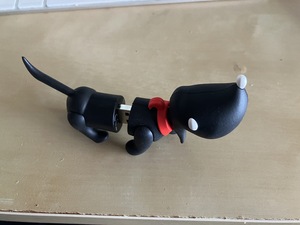
Where we're going, we don't need roads^W cables [3]
I have a bluetooth Apple keyboard and a Magic Mouse, which is a problem when you setup a brand new computer, so I had to temporarily steal Anton's keyboard and mouse, plug them along with the dog, and boot things up.
Still afraid to brick everything, I started in "live mode" to look around, and see that I could at least detect and use my bluetooth keyboard and mouse, before actually erasing my disk and installing the OS. It worked surprisingly well, which gave me confidence to go ahead.
The installation went smoothly and I was happy, until I tried to connect to the wifi. It turns out that the iMac uses a Broadcom wifi adapter, that requires a proprietary driver, definitely not included in the ISO.
So I had to take the iMac downstairs and plug it directly to the Ziggo box to get the wifi working.
I have no tools because I destroyed my tools with my tools [4]
Fortunately Apple does not use some weird Ethernet adapter, and I could easily find out how to download and setup the right kernel modules here. It went well, but since I'm very good at skimming through documentation instead of actually reading it, I made two mistakes:
- I did not think that
sudo akmodsfailing might be a problem (in hindsight, lol) - Even though I had pulled lots of updates (including kernel ones), I thought that rebooting was a good idea
When the machine went back up (with a new kernel), I did not have bluetooth anymore (and still no wifi).
After replugging Anton's keyboard and mouse, learning how to change the booted kernel version, a reboot, installing kernel sources and this time properly building kernel modules, I was back to business, with bluetooth and wifi working!
I bid farewell to wired accessories, took the iMac back upstairs, and started setting things up.
Configuration adventures
Overall, getting up to speed was much faster than I was expecting, so I will only talk about two things.
Adapting to muscle memory
The human body and mind are incredible things: even though I am working from at least 4 different computers at home (two iMac-s, one Windows PC, and one Windows laptop, each with their own specific keyboard layout), my fingers automagically adapt to whatever is in front of me.
It was therefore important for me to be able to not use "CTRL+" shortcuts but their Mac equivalent "Command+".
Thanks to Gnome Tweaks, it's actually very easy: all it takes is to use the "Ctrl is mapped to Win and the usual Ctrl" option.
And by overriding the Command+Space shortcut to "Search" in Gnome's regular "Keyboard shortcuts" preferences, I almost feel like I'm still on Mac OS.
My life was about upgrading, now it's about downgrading
The second noticeable configuration adventure is a fun one, and marks a big shift for me: after years trying to upgrade software by hand (because I was on an outdated MacOS version), I now need to downgrade some software by hand :-)
For context, I'm a big Sublime Text fan, and in order to have it properly format code for GCC development, I use the ActualVim package. ActualVim delegates all editing actions to an instance of NeoVim, and makes Sublime do exactly what I need <3
However, on the "new" iMac, things were only partially working; in particular,
typing / would not do anything, instead of opening a "search box". A bit of
debugging showed that ActualVim was expecting 6 elements in the cmdline_show
UI event, and was getting 7 from NeoVim. It turns out that Fedore 43 ships
Neovim 0.11, that has a related
API change!
Since ActualVim is pretty old and likely not maintained anymore, the easiest was for me to build NeoVim 0.10 from sources.
I have no idea whether there are 3 of us in the world using ActualVim or thousands (in other words, whether it's worth fixing), but I plan to investigate and if it makes sense, to try to fix this.
Thoughts about the move
I'm writing this on my third day after installing, and I am very, very happy to have done it: things are working surprisingly well, and I am able to do all the coding and testing I want directly on the iMac.
I still have a few minor things to sort out (e.g. be able to change screen
brightness from the UI and not by writing numbers in obscure files in /proc
:-)), but nothing important nor urgent.
The old iMac is dead, long live the old iMac!
--
[1] We have a more recent one, but it's used primarily by Nathalie for her work so I don't want to mess with it :-)
[2] I did have to change the hard drive a while ago, but that's the only issue I got in all these years.
[3] Quote from the "Back to the future" movie.
[4] Quote from James Mickens' hilarious The Night Watch.